Dashboard
The dashboard is the whole product: anything you can do from the CLI, you can do here.
ratchet serve serves it at http://127.0.0.1:8080. It is designed for someone who is
slightly suspicious of the machine's verdict, so every screen puts the decision first, the
evidence one click away, and the mechanism (which judge said what) in a disclosure.
Some conventions hold on every screen:
- Color never carries meaning alone. Every chip pairs a color with a word or a glyph (ADR 0015), so the screen reads the same in a screenshot, on video, and for color-blind readers.
- Every number has its unit and source. A cost names the tier that spent it, a confidence names the judge that gave it, and a time shows its time zone.
- Uncertainty is visible. Uncertain pairs, truncated evidence, unavailable drift checks and recorded runs show as badges, not footnotes.
- Every action is reversible. Each one is a git commit, and the undo path is written next to the button.
- Dark first. The header has a Light theme / Dark theme toggle.
Navigation
| Host | Primary navigation |
|---|---|
| Your own install | Timeline · Verdicts · Traces · Digest · Costs |
Public demo host (RATCHET_PUBLIC_MODE=true) |
Simulate · Timeline · Verdicts · Digest · Costs |
The header also shows the spend ticker: today's spend, with a small bar and a figure per tier (N S U). When the models are simulated, the header shows a Simulated models badge with the hint "Produced by Ratchet's offline simulator, not Nemotron. Set NEBIUS_TOKEN_FACTORY_KEY to use real models."
Chips, badges and tier letters
Decision chips
| Chip | Word in headlines | Action Ratchet took |
|---|---|---|
| ✓ PASS | "Passed: …" | Merged to main |
| ! WARN | "Held: … Review before merging." | Held on candidate |
| ✕ BLOCK | "Blocked: …" | Reverted on candidate |
Outcome chips (one per replayed task)
| Chip | Meaning |
|---|---|
| ✓ Same result | Output meets the criteria; differences are cosmetic. |
| ↑ Better | Meets the criteria and improves on one. |
| ~ World changed | A fact changed since the original run; the new output follows from it. |
| ✕ Got worse | A criterion is no longer met, or a new hard side effect appeared. |
| ? Not sure | The judges could not settle it. Held for a human. |
| – Could not replay | The sandbox or the agent failed on this task. |
Tier badges and the judge trail
Each judge appears as a letter badge: N Nano, S Super, U Ultra. The judge trail shows the badges in cascade order, joined by arrows (N → S → U), each with its verdict glyph:
| Glyph | Opinion |
|---|---|
| ✓ | Equivalent |
| ✕ | Regressed |
| ↑ | Improved |
| ? | Uncertain |
A dashed badge, such as S, is a tier that was not called: "Not needed: decided earlier in the cascade." Hover or focus a badge for its tooltip, for example "Nemotron Super judged regressed with 92% confidence. The VAT line is missing."
Level 0 markers
| Marker | Meaning |
|---|---|
| No action change | The replay made the same side-effect calls as the golden. |
| Changed args | Same tool, different arguments. Passed on to the cascade. |
| Hard fail | A new call of a hard class (irreversible write, destructive, send or spend): "Checked without a model: 6 new write_irreversible calls." |
Badges
| Badge | Meaning |
|---|---|
| Simulated models | Produced by the offline simulator, not Nemotron. |
| Recorded run | "Served from a recorded run of this scenario, not computed live." |
| Truncated | "Some evidence was shortened to fit this judge's context." |
| Drift check unavailable | Tavily could not be reached; the difference is treated as a possible regression. |
| Blocked action | The mock tool server refused this call (409 ratchet_blocked). |
| World-dependent | The golden relies on facts about the world, so drift checks apply to it. |
Landing and the judge path
On a public host, / is the judge path: a headline, one paragraph about Ratchet, the loop
in six steps, and three skill edits to try. Each scenario card shows the skill, what
the agent learned, what Ratchet should catch, and the expected decision (muted until the run
finishes).
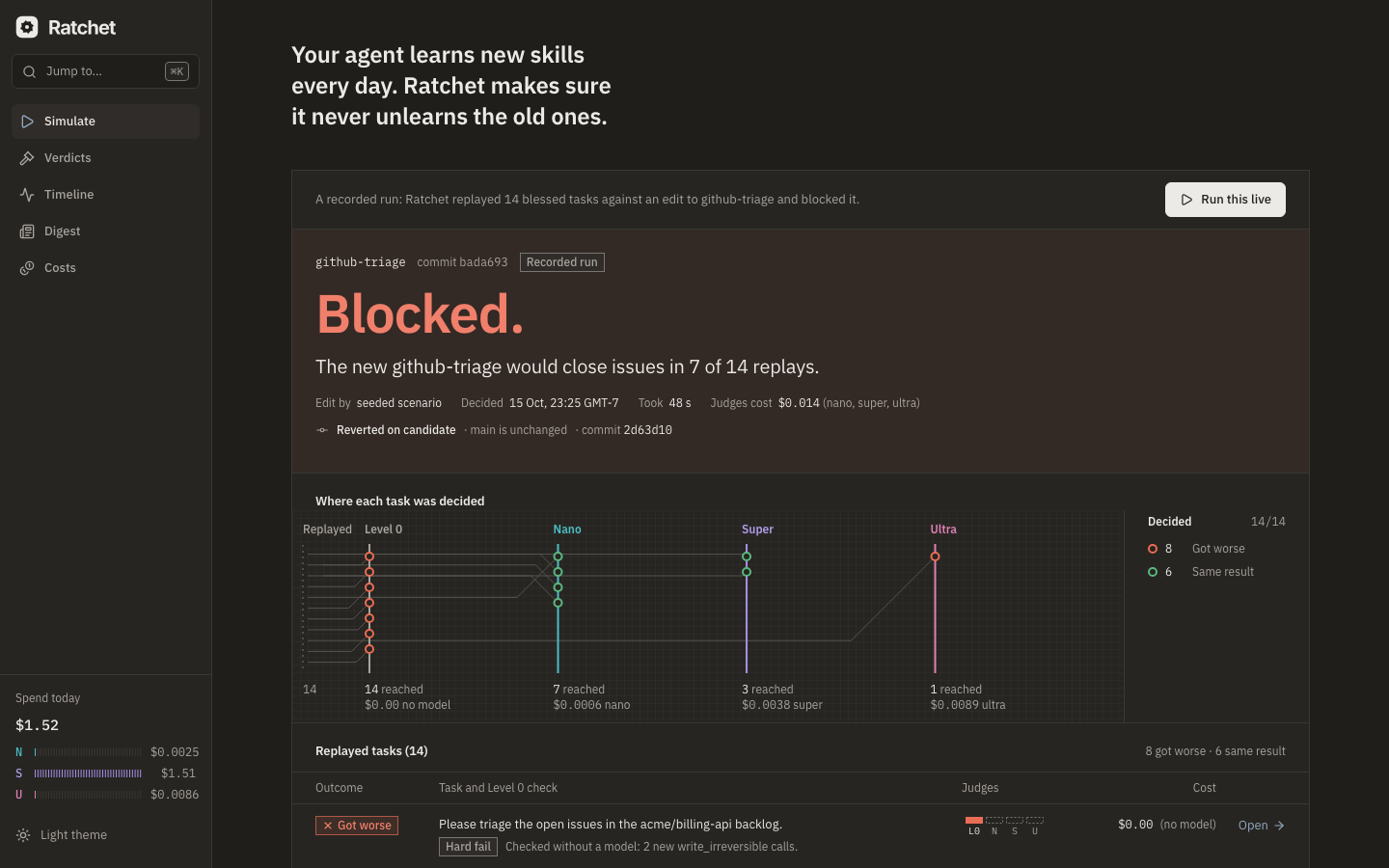
| Card state | What you see |
|---|---|
| Idle | Simulate |
| Running | The progress strip inline: stage, tier, elapsed time and running cost |
| Queued | "5 judges are running scenarios; yours starts in ~20 s" |
| Done | The decision chip filled in, and Open verdict |
| Failed | "This run didn't finish. The scenario was reset; nothing changed." with Try again and View a recorded run |
Each run takes about 20 seconds and is yours alone: it runs on your session's own copy of the demo skills repo, and nothing you do changes another visitor's view. The scenarios are:
| # | Skill | What the agent learned | Expected |
|---|---|---|---|
| 1 | github-triage | Triage now also closes every issue with no activity in the last 30 days as not_planned |
✕ BLOCK by Level 0 |
| 2 | expense-report | Parsing now takes every amount from the line items and skips the summary block, which drops VAT on one receipt layout | ✕ BLOCK by Super and Ultra |
| 3 | fx-expense-converter | A wording-only tidy-up; meanwhile EUR/USD moved from 1.0800 | ✓ PASS with drift |
On your own install, / shows the same cards. Seed the demo first (ratchet seed-demo).
Progress strip
While an edit is being checked, the verdict page pins a progress strip to the top. It shows the stage, the tier, the elapsed time and the running cost. The stages are fixed:
Detected edit → Choosing tasks (n) → Replaying on runner (k/n) → Checking actions → Nano screening (n) → Super checking (n) → Ultra deciding (n) → Asking Tavily (n facts) → Writing the summary → Done
The runner is named honestly: "Nebius Jobs" only when replays really run on Nebius Serverless Jobs, "the local runner" otherwise. If a stage shows no change for 20 seconds, the strip reads "Still working — stage is taking longer than usual."
Verdict page
/verdicts/:id is the page a notification links to. It loads its header first.
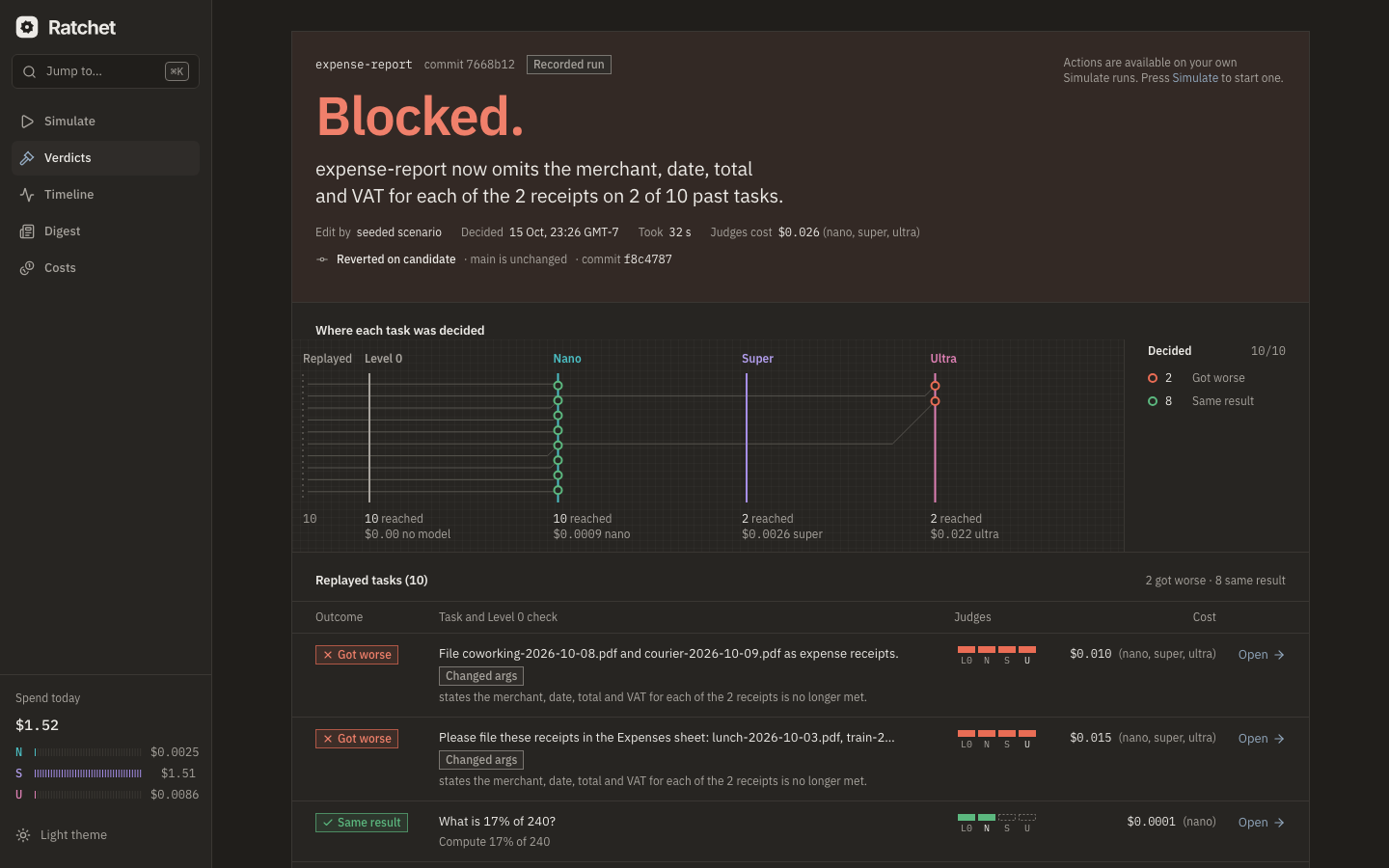
Header band
- The decision chip, with the Recorded run and Simulated models badges when they apply.
- The headline: the first sentence of the summary, for example "Blocked: the new github-triage would close issues in 6 of 14 replays."
- Metadata: skill(s), who made the edit (the agent, you, or "seeded scenario"), when it was decided, how long it took, and the judges' cost by tier.
- A notice when a verdict-level reason applies (replays failed, final judge timed out, spending cap reached, merge conflict, stacked on a held edit), in the wording from the error code table.
- The status line: "Merged to main", "Held on candidate" or "Reverted on candidate · main is unchanged", with the commit. After a rollback: "Rolled back by actor at time", the revert commit, and a link to re-apply it from the edit page.
- The action buttons (see Actions).
Main column
- Summary. At most 180 words of plain prose, "Written by Nemotron Ultra from the evidence below."
- Skill diff. A unified diff per file, collapsible, with a "What changed:" line and a link to the edit page. Collapsed by default on phones.
- Replayed tasks. The pair grid has one row per golden: the task, the outcome chip, the Level 0 marker, the judge trail, the cost and Open. Rows are sorted Got worse, Not sure, Could not replay, World changed, Better, Same result. Forty pairs render without pagination.
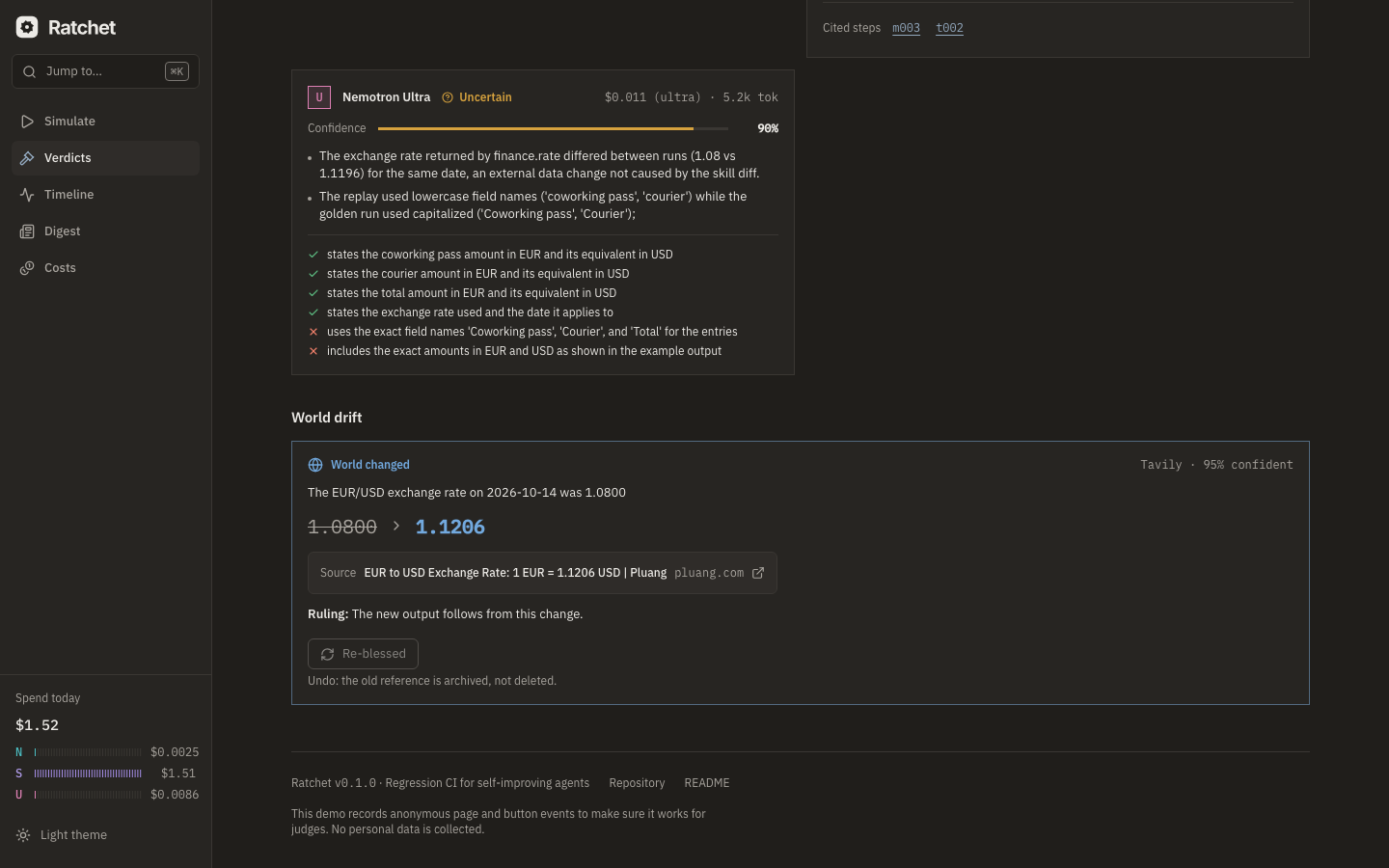
- World drift. Shown only when there are drift checks. Each drift card holds the fact statement, the old value → the new value, the Tavily source link, the confidence and the ruling, plus Re-bless for each changed task.
Side column
- Cost of this verdict: Nano, Super and Ultra with token counts; the judging total; "If Nemotron Ultra judged everything" (the counterfactual); "cascade saved $X (N×)"; and the agent replays' cost, on the same model as the original runs.
- Stages: each pipeline stage with its elapsed time.
- Evidence quality: counts of truncated opinions, uncertain pairs and unavailable drift checks.
- Debug (collapsed, Show logs): the verdict id, runner, batch ids, and a log summary that lists every blocked call.
The page title is <Decision> — <skill> — Ratchet, so browser history stays readable.
Pair detail
/verdicts/:id/pairs/:golden/:replay puts the golden (original run) and the replay (with the
new skill) side by side. Each column lists the steps (model calls and tool calls) with
step ids, the tool name or tier, normalized arguments (collapsed), a 400-character result
preview and the side-effect class. Steps that differ are highlighted.
- Jump to first difference scrolls both columns to it.
- The Level 0 card lists "New in replay" and "Missing in replay" calls, and how alike the two final outputs are: "Final output: identical", or "Final output: 87 % similar" (ADR 0024). When Level 0 found a difference (any changed call, or outputs under 90 % alike) and a later stage decided the pair, the card adds "Nano could not clear this pair alone (Level 0 found differences)."
- Opinion cards show one card per tier consulted: verdict, confidence bar, reasons, and cited steps. Click a cited step to scroll the columns to it. A truncated opinion carries the Truncated marker.
- The pair's drift cards, if any, appear below.
On a phone the two columns become tabs (Golden | Replay), with a Differences only toggle.
Edit page
/edits/:id shows one skill edit: author, commit, parent on main, when it was detected,
its diff, and a link to its verdict ("Ratchet is still checking this edit." while it runs).
After a rollback, you re-apply the edit from here.
Timeline
/timeline lists every edit, verdict, blessing and action, newest first and grouped by day.
Filter by kind (All, Edits, Verdicts, Blessings, Actions), by skill
and by decision. Each item links to the object it is about. New events arrive live over SSE.
The feed pauses while the tab is hidden and resumes on focus. An empty timeline says
"Nothing here yet. Bless a finished task or simulate a scenario."
Verdicts
/verdicts lists every skill edit Ratchet checked, newest first, with the decision, the
headline, the skills, the cost and the outcome counts.
Traces and the golden library
/traces is the golden library: blessed tasks Ratchet replays when a skill they use
changes. Columns: task, skills, the world-dependent flag, the number of facts, when it was
last replayed, and when it was blessed. Search filters by task. Show recent runs lists
finished live runs that aren't blessed yet ("Open one and press Bless to protect it.").
/traces/:run_id shows one trace: the task, final output, agent tier and harness, skills,
success criteria (Edit criteria → one criterion per line → Save criteria;
the next replay uses them), world facts (each marked Volatile or Stable), steps and
artifacts. The buttons are Bless on a live run and Unbless on a golden.
The library is hidden on the public host.
Costs
/costs shows spend from the proxy's ledger:
- Three tiles: Today, This week and This edit, each split by tier with token counts.
- By purpose this week: Agent replays, Screening (Level 1), Checking (Level 2), Adjudicating (Level 3), Extracting world facts, Writing summaries, Benchmark and Embeddings, each with calls, tokens and cost.
- Judging spend by day, as a chart or as a table (Show as table).
- Counterfactual: the judging spend against what Nemotron Ultra alone would have cost.
- A link to the benchmark report when
RATCHET_BENCH_REPORT_URLis set.
The page notes that agent replays run on the same tier as the original task, so any difference is the skill's, not the model's.
Prompt-cache share
Of the prompt tokens billed, the prompt-cache share is the part the provider served from its
prompt (prefix) cache: Token Factory's usage.prompt_cache_hit_tokens, or
usage.prompt_tokens_details.cached_tokens on OpenAI-style servers. The proxy records it
with every call's cost row. Each tile on the page ends with one line, for example
"Prompt-cache share: 0.41 of prompt tokens (nano 0.52 · super 0.38 · ultra 0.12)", where a
tier that sent no prompt tokens reads n/a and a tile with nothing recorded reads "Prompt-cache
share: not recorded". You can also read it from these places:
GET /api/v1/costs: every tile (today,week,window) carriesprompt_tokens_by_tier,cached_prompt_tokens_by_tierandcache_share(hits / prompt tokens over all tiers,nullwhen no prompt tokens were billed).uv run ratchet status: the last line,Prompt-cache share today: 0.42 of prompt tokens were cache hits (nano 0.00, super 0.51, ultra n/a).- The proxy's
/metrics:ratchet_model_cached_prompt_tokens_totaloverratchet_model_prompt_tokens_total. - The benchmark report, under Table 2.
On simulated models the hits are the simulator's count, not a measurement. A request that continues a conversation counts the prefix its previous turn already sent as cached, and a first turn counts nothing.
Digest
/digest shows the weekly digest, written by Nemotron Ultra (at most 250 words) from the
week's edits and verdicts, with links to the verdicts it mentions. Learned this week
lists the merged skills, and Blocked this week lists the blocked ones. Until the first
digest exists: "No digest yet. The first one is written at the end of the week."
ratchet digest run writes one now.
Settings
/settings is read-only: "Change these in .env and restart Ratchet." It shows the
harness, the job runner, the sandbox, whether a webhook is configured, the model id for each
tier, and the daily spending caps. It is hidden on the public host. See
Configuration.
Component kit
/__kit renders every dashboard component in every state, from sample data: decision chips,
outcome chips, tier badges, the judge trail, the progress strip, cost panels, diff viewer,
pair grid, opinion and drift cards, toasts, empty and error states. It exists for rehearsal
screenshots and visual checks. It is not linked from the navigation.
Actions and confirmations
Which buttons a verdict shows depends on the action Ratchet took:
| Ratchet's action | Buttons |
|---|---|
| Merged (PASS, or approved) | Rollback |
| Held (WARN) | Approve and Rollback |
| Reverted (BLOCK) | Approve anyway (main never changed, so there is nothing to roll back) |
| Rolled back by a person | none; the status line links to the edit page to re-apply |
Every action opens a dialog that names the exact git operation, with the undo path below the button:
| Action | Dialog | Confirm button | Undo | Toast |
|---|---|---|---|---|
| Rollback | "Roll back this edit?" "This reverts commit sha on candidate and leaves main unchanged. You can re-apply it later from the edit page." | Roll back | Re-apply from the edit page. | "Rolled back. main is unchanged." |
| Approve | "Approve this edit?" "This merges candidate into main. Your agent will use the new skill on its next task. Rollback stays available." | Approve and merge | Rollback stays available. | "Merged. skill is live." |
| Approve anyway | "Approve this blocked edit?" "This re-applies the reverted edit to skill and merges it into main, overriding the block. Your agent will use it on its next task. Rollback stays available." | Re-apply and merge | Rollback stays available. | "Re-applied. skill is live." |
| Re-bless | "Re-bless this task?" "This makes the replay the new reference for "task" and archives the old one with the reason "world changed"." | Re-bless | The old reference is archived, not deleted. | "Re-blessed. Future checks compare against today's result." |
| Unbless | "Unbless this task?" "Ratchet stops replaying "task" when its skills change. The run and its steps are kept." | Unbless | Bless it again from the trace page. | "Unblessed. Ratchet no longer replays this task." |
If someone else is already acting on the same verdict, the action fails with "Someone else is acting on this verdict." If an earlier held edit is in the way, Approve fails with "An earlier held edit is still on candidate. Approve or roll it back first."
Public-host behavior
With RATCHET_PUBLIC_MODE=true, the dashboard becomes a public demo:
- Session isolation. Your first visit gets a
ratchet_sessioncookie (HttpOnly, 24 h). Each Simulate run applies the scenario edit to a copy of the skills repo for your session only. Your events, edits and verdicts carry your session's hash, and the live feed shows only your session's events plus global ones. Session copies reset afterRATCHET_SIMULATE_RESET_S(10 minutes); the verdict pages stay readable, so links keep working. - Owner-only actions. On another visitor's verdict, the action area says "Actions are available on your own Simulate runs. Press Simulate to start one."
- Action token. The page fetches the day's action token from
/api/v1/metaand sends it with every action. A page left open past the daily rotation gets "This page is out of date. Reload and try again." - Rate limits. 10 actions a minute per visitor ("Too many actions in a minute. Wait a moment and try again."), one Simulate run at a time per visitor, 5 concurrent sessions with a queue of 20 behind them ("Many judges are running scenarios right now. Try again in a minute, or view a recorded run.").
- Hidden screens. Traces, the golden library and Settings show "Blessing and recording are off on the demo. Run Ratchet locally to protect your own agent."
- Recorded runs. In replayed mode (
RATCHET_SIMULATE_MODE=replayed), Simulate serves verdicts recorded earlier on live models, with the Recorded run badge. With Simulate off: "Simulate is off on this host. Recorded runs are on the timeline." - Analytics. The footer says "This demo records anonymous page and button events to make sure it works for judges. No personal data is collected." See Security and privacy.
Control replays on the verdict page
A pair whose outcome was contested shows a Control: agrees or Control: diverges badge. A diverging control makes the row read "Same result (noisy task)"; its judge trail ends with a C badge whose tooltip explains that the unchanged skill also produced a different result. The side panel's Evidence quality lists "Control replays: N (M diverged)", and the stage timeline has a "Replaying controls" row. On the operator host the pair page links to the control run's trace.